
Websites for businesses everywhere
TMA Studio

Your business deserves a website that works as hard as you do.

TMA Studio creates your new website from start to finish, and it also improves the website you already have. Same attention to your business either way.

Historic street with shops in Savannah, Georgia
Made for businesses like yours

Your customers are on their phones. Your website should meet them there.

● Taking new clients
The site is yoursYour name, your address on the web — handed over to you whole
Your money stays yoursPayments go into your account, in your name
Built for phones firstEasy to read and easy to tap, wherever your customers are
Near or far, same careTMA works with businesses near and far — and across the seas.
One live store, open now

See a real one.

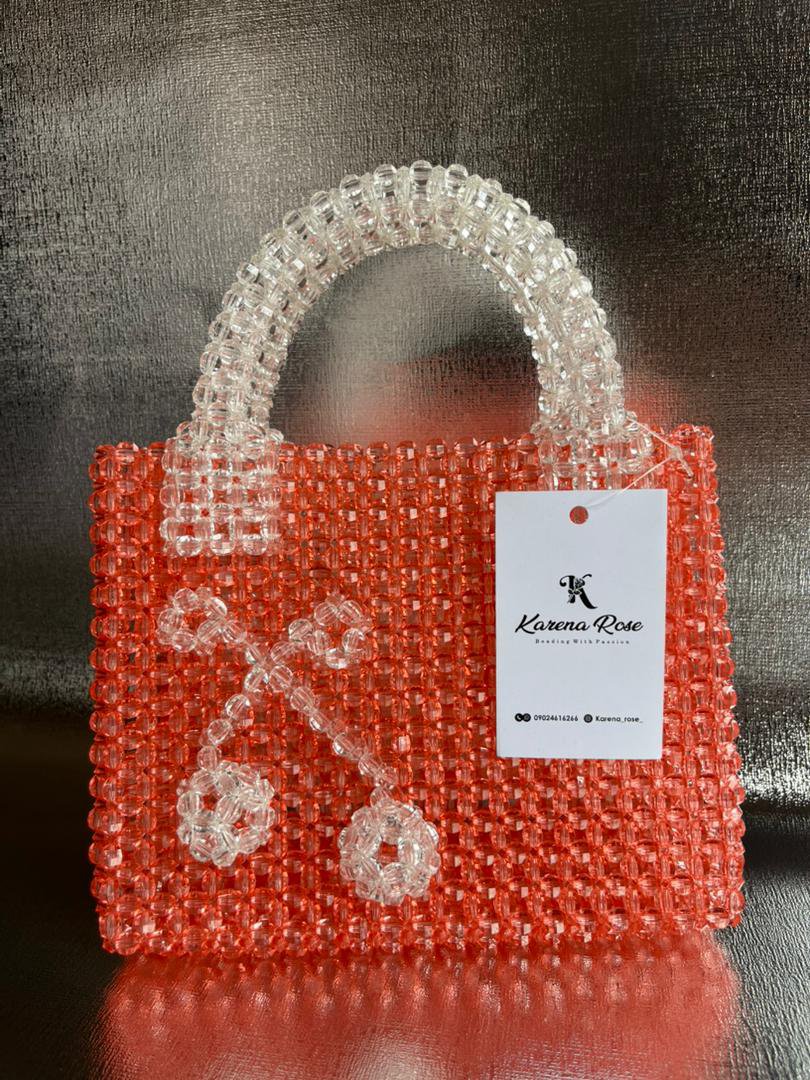
This is a store built by TMA for a business in Port Harcourt, Nigeria, open for business right now. That's the kind of site TMA can build for you.

Coral beaded tote bag with clear beaded handles and a Karena Rose tag, from the Karena Rose store

Karen makes handmade beaded bags in Nigeria. Her store shows all 12 of her bags with photos and prices, and her customers can order from anywhere. People saw her site and started asking how they could get one like it — maybe that's how you got here, too.

  • 12 bags, each with its photo and price
  • Her own web address — karenarose.com
  • Orders come straight to her phone
  • Every payment goes straight to her
Visit her store →

Style example — this picture shows where the salon's own photos would sit on their page.

Respite Hair Care — Savannah

SAMPLE SITE

This is a sample for a small salon in Savannah on Drayton Street, built by TMA. Good salon — five stars from the people who go there — but if you searched for them online, there was nothing to find. This sample shows what their page could look like.

  • Haircuts, braids, balayage, and beard trims, right up front
  • Their hours and phone number where customers can find them
  • Their reviews on the page, where new customers can see them
  • A way to book an appointment without calling
See what a site like this costs →

If your customers find you by word of mouth, imagine what a good page does.

Somebody hears your name, looks you up, and lands on a page that shows your work, your prices, and your reviews — and lets them call you, book you, or buy from you on the spot. That's exactly what TMA builds for you.

Salons & braidersBarbersBoutiquesHandmade goodsFood & snacksCleaners & home servicesAny one-person shop

Three prices. That's it.

Same quality at every price. Every site is built around your business, your words, and your photos to the same standard, so paying more gets you more included, not better work. Booking is added at Standard, selling is added at Premium, the care stays the same.

Which one do you need?

Not sure which one fits your business? A few quick questions, and TMA points to the price that fits — even if it's the cheapest one.

Basic — $150–$250

Your business on one page: what you do, your prices, your photos, your hours, and the good reviews your customers have already left you. That's plenty for a lot of businesses.

Start with Basic →

Basic

$150–$250

For when you just need a real place online, so customers can find you and see what you're about.

  • Your business on one page
  • What you do, and your prices, written out clear
  • Your photos, presented well
  • The reviews your customers already left you on Google or Facebook, shown right on your page
  • Your hours, directions to you, and a tap-to-call button
  • No appointment booking
  • No card payments
Start with Basic

Premium

$450–$500

For when you have things to sell. Your products get their own store, like Karen's.

  • Everything in Standard
  • Sell your products right on your site
  • Extra pages if your business needs them
  • 30 days of changes included after your site is live
Start with Premium
How paying works, on every site: half up front to start, half when your site is finished and handed over to you. Your web address and your payment account are bought in your name and stay in your name — they're yours. And if you need changes down the road, 30 days of changes is +$75 — it's already included with Premium.

Sample styles

Four ways a site can be put together — and every one of them is live. Tap Try it live on any style and use it like a real site: tap the buttons, pick things, watch it answer back. Pick the one you like, or ask for your own way — the words, photos, and prices on it are still yours.

Style 1 — Down the middle

Everything sits in one column down the middle — one thing under the next, straight down the page. Tap Try it live and use it like a real site — add things to an order and watch the total.

Choose this style

Style 2 — Down the side

Your name and buttons sit in a column down the left side. Everything else sits on the right. Tap Try it live — the side buttons switch the page, like a real site.

Choose this style

Style 3 — Pictures first

One big picture up top, with rows of your photos under it. Tap Try it live — tap the small photos and the big one changes, like a real shop.

Choose this style

Style 4 — All in cards

Your prices and services sit as tiles in a grid, with a column down the side. Tap Try it live — tap the cards to pick a service and get a price.

Choose this style

Your own way

None of the four? Say how you want your site arranged, and it gets built that way instead. Tap Try it live and move the blocks around yourself.

Choose your own way

How we get yours done

Four steps, and you see everything before you pay the second half.

1A few details about your business — that's all it takes to start.

What you do, your prices, your hours, and any photos you have.

2You pay half to start

TMA gets to work and builds your site — pages, photos, prices, the lot.

3You look it over

TMA sends the page to look at on your own phone. Say what to fix, and it gets fixed until it looks right.

4It's yours

You pay the second half, your site goes up on your own web address, and it belongs to you.

Here's how TMA puts you on the map, using your business name the way Google looks for it.

When somebody nearby picks up their phone and searches for what you do — a salon, a shop, a service like yours — your site should be one of the things that comes up.

  • Your business name, address, and phone number are written right on the page, in plain words
  • They match exactly what's on your Google listing, so Google can tell it's the same business
  • What you offer is written out in the words your customers actually search for

Quick questions, answered.

The short version, before you order.

Who owns the site and the web address?

You do. Your web address is bought in your name and stays in your name — the site is handed over to you whole.

Where does the money go?

All the money runs through your own account — never through TMA.

Will it work on phones?

Yes — sites are built for phones first, easy to read and easy to tap, wherever your customers are.

What if I need changes later?

30 days of changes is +$75 — it's already included with Premium.

Place your order.

Pick your package, fill in your details and what TMA will need from you, then tap Place Order. Your email opens with the whole order written in — you just look it over and hit send.

1  Pick your package
Style
2  Your contact details
3  What TMA will need from you

That gives TMA everything it needs to start. If you have photos of your business, attach them to the order email before you send it — real photos of your real place beat polished ones every time, and the details get polished together on the call.

Photos: when your email opens, attach photos of your business — your work, your shop, your products — before you hit send. Good photos are what make the page yours.

Tapping Place Order opens your email with your order already written in. Nothing goes out until you hit send in your email.

Already ordered? This is where you pay

Pay for your website.

When TMA gets back to you about your order, it tells you your exact amount. Then you come back here and pay it by Chime, Venmo, or Zelle. Half is due to start your site, and the other half is due when your site is finished and handed over to you.

1Pick your package

The one you ordered, and which half this is.

2Check the amount

Pay the exact amount TMA gave you.

3Send it

Chime, Venmo, or Zelle — with your business name in the note.

How much is due?

Pick your package and which half you're paying. Your exact amount is the one TMA gave you when it got back to you.

Your package
Which payment is this?
$75–$125 due

Basic runs $150–$250 in full. This first half gets your site started. Send the exact amount TMA gave you, by Chime, Venmo, or Zelle, with your business name in the note.

Pay by Chime

Pay from your Chime app, to TMA Studio.

$75–$125 due
  1. Open the Chime app and tap Pay / Pay Anyone.
  2. Send the amount shown above to the Chime details TMA gave you — the exact amount TMA gave you.
  3. Put your business name in the note, so your payment lands on the right website.
Paying for 30 days of changes on its own? That's $75 flat — send it the same way, by Chime, Venmo, or Zelle, with your business name in the note. (It's already included with Premium.) Haven't placed your order yet? Start your order first →
Sample preview
Style preview